en


The MYBET88 login is now the MB8 login. The sign-in screen carries the current logo with a line that names the old one, so a returning player can see straight away that it is the same platform under its current name.
This page handles both jobs: getting back into an account you opened under the old name, and opening a new one from scratch.
Start with the obvious test. Try to log in to your old MYBET88 account with the username and password you used before. If they are accepted, you are in, and there is nothing else to do.
If the MYBET88 log in screen rejects them, use Forgot Password. Enter either your phone number or your username, and a reset password is sent by SMS to the number registered on the account. The MYBET88 forgot password route runs on that phone number, which is why it matters that the number on the account is still one you can receive messages on.
Two cases need a person instead of a form. If the SMS still does not arrive after you have asked for it again, Live Chat is the next step. The same applies if the username itself is what you cannot remember, or if the platform tells you that your personal details are already in use by another account. In each case, have the phone number you registered with ready, because that is the detail support uses to match you to the account.
Whether your specific old details are still live is something only the account itself can answer. The three steps above are how you find out, and they are faster than starting over. Nothing about the name itself changes how the cashier, the promotions or the games work, and you can read more about what changed with the name at your own pace.
Tick the steps as you go; your progress stays in this browser.
Keep in mind
One active account per member. If an old login fails, resetting the password or asking Live Chat is the way back. A second account opened out of frustration can cost the bonuses and winnings of both, because promotions are limited to one per person, household, IP address, phone number and bank account.
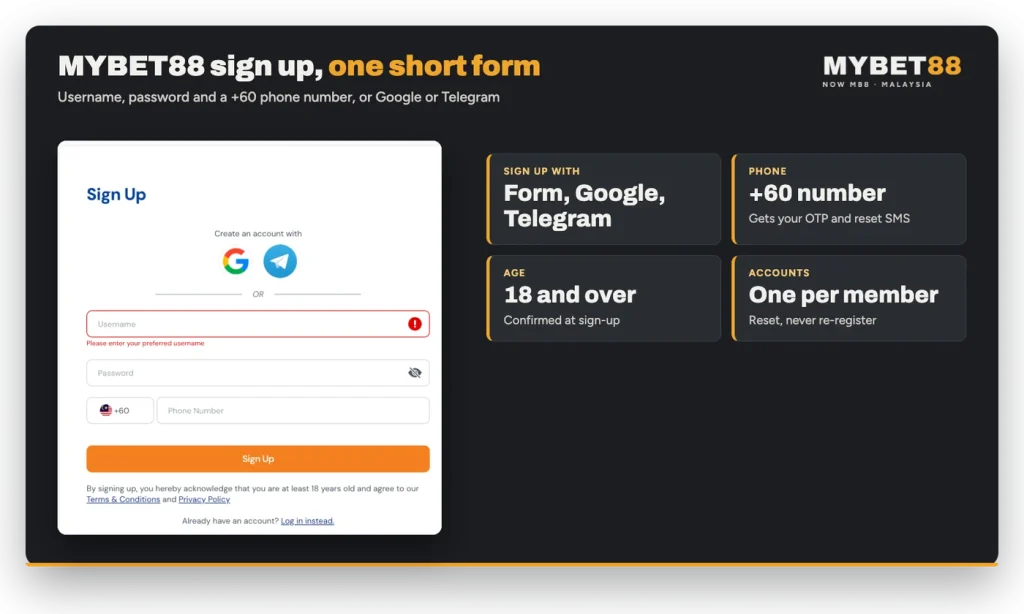
New players get a short form rather than a long application. There is no separate daftar MYBET88 page: registration runs through the MB8 sign-up panel, and it asks for three things only.
A MYBET88 sign up needs a username, a password and a phone number with the +60 prefix. If you would rather not type any of it, you can create an account with Google or with Telegram instead. By signing up you confirm that you are at least 18 and that you accept the Terms and Conditions and the Privacy Policy.
The same credentials work everywhere the platform does, so if you expect to play on your phone most of the time, register once and sign in from your mobile browser afterwards.
When you register a MYBET88 account today you are registering at MB8, and the sign-in screen you use on day one is the one you will use every day after.
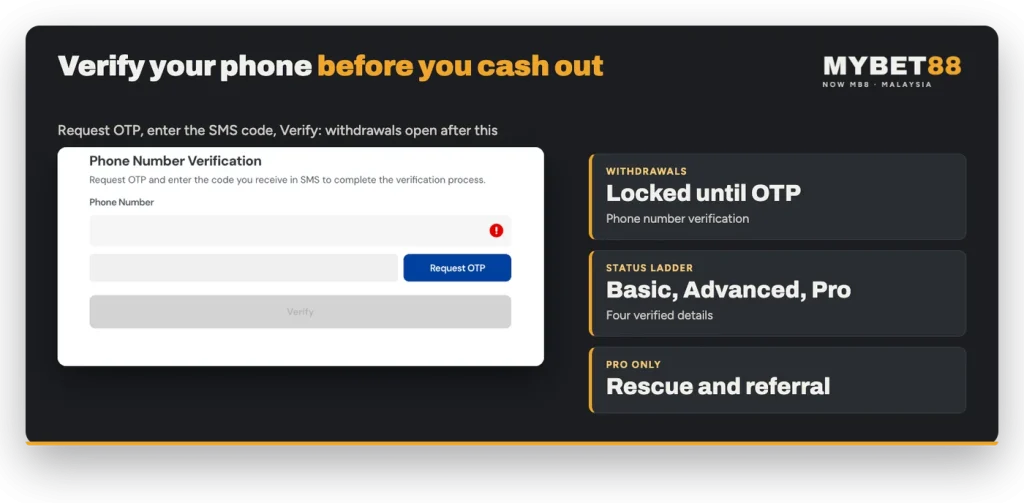
Withdrawals stay locked until the registered phone number is verified by OTP. The prompt says it plainly: verify your phone number now to secure your account and unlock withdrawal feature. The sequence is Request OTP, then the code from the SMS, then Verify.
Do it once, early: it is the step that stands between a new account and its first payout. Verification also keeps the reset channel open, because the password SMS goes to the same number.
While you are in there, line up the money side too. The account name you withdraw to has to match the name you deposited from and the full name on your profile, which should be checked before your first deposit rather than after.
The profile page holds four details that matter. Full Name is fixed once it has been set, so type it exactly as it appears on your bank account. Phone Number and Email Address each have their own Verify action. Date of Birth is submitted once. Connected Accounts is where a Google sign-in can be linked. Anything outside these fields is changed through support rather than by you.
Above them sits an account status ladder: Basic, Advanced and Pro. Completing verification of those four details is what moves an account up the ladder.
Status is not decoration. Refer A Friend is available to Pro members only, and the Weekly Rescue Bonus also requires Pro account status. If either of those interests you, finish all four verifications early instead of leaving the email or the date of birth for later.
Change Password sits in the member area and asks for your current password, the new one and a confirmation. Use it immediately after any reset by SMS, so the temporary password stops being valid.
Support happens in the live chat inside the platform, 24 hours a day. That is the only place you need to discuss an account problem.
As a general rule, a real support agent will never ask for your password or an OTP code in a chat app, by SMS or over a call, whatever name they use. Look-alike login pages are a standard trick across the industry: a page that imitates a familiar sign-in screen collects whatever you type into it. If a page carrying the old MYBET88 branding asks for your details and nothing about it matches the screen described here, stop and reach us through live chat instead.
| Detail | Today |
|---|---|
| Sign-up fields | Username, password, phone number with the +60 prefix |
| Sign-up alternatives | Create an account with Google or with Telegram |
| Password reset channel | Reset password sent by SMS to the registered phone number |
| Withdrawals open after | Phone number verified by OTP |
| Account levels | Basic, Advanced, Pro |
| Legal age | 18 and over |
| Support | Live chat, 24 hours a day, 7 days a week |
Keep the phone number on the account current and the rest of this page becomes routine: one login, one reset channel, one account.