en


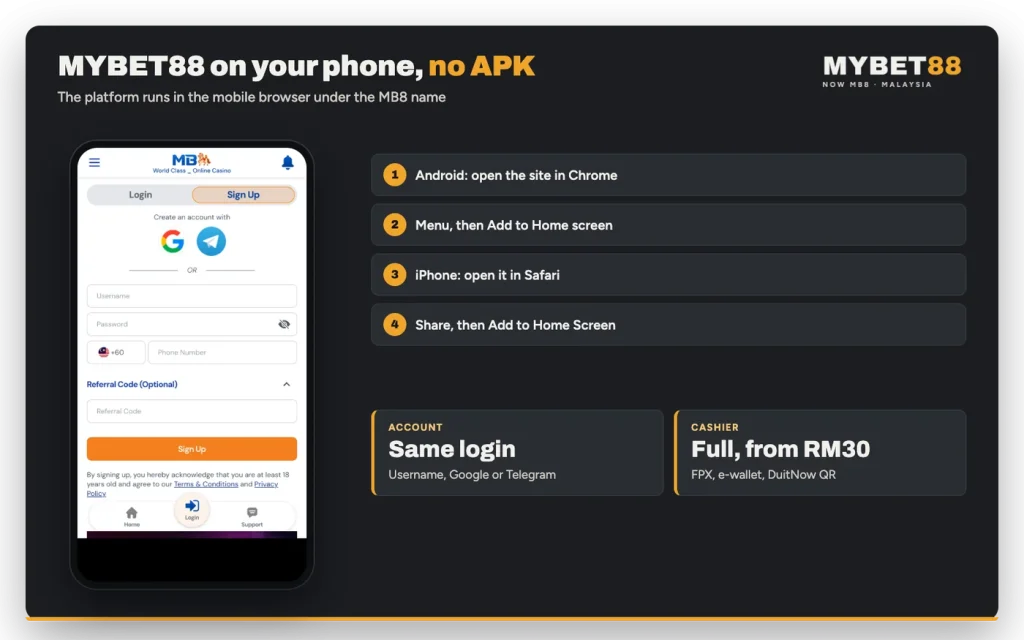
There is no MYBET88 app to download, and no APK file or store listing comes from us. The platform you knew under the old name now runs as MB8, and on a phone you play it in the mobile browser with the same account, the same lobby and the same cashier. Add it to your home screen once and it opens with a single tap, much like an app. Here is how to set that up, and how to recognise a file that only pretends to be ours.
The whole platform is built to run in a browser. Lobby, cashier, member area, history, rewards and the 24-hour live chat all load on a phone screen, so there is nothing to install before you can play and nothing to update afterwards.
That also means we publish no download button, no APK and no app store page. Anything presenting itself as our installer came from somewhere else.
This is simpler, not poorer. You sign in through the same login form on any device, your wallets and transaction history follow the account rather than the handset, and a borrowed or replaced phone needs no setup beyond opening the browser.
On your phone you will land on MB8: a logo with a star, carrying the line formerly known as MYBET88 underneath it. The old web addresses forward there too, so an old bookmark should still bring you to the current login screen.
So if the page says MB8, you are in the right place. If an icon still says MYBET88 and asks for an install, it is not ours. The practical detail behind the name change is simply which brand to look for; everything the cashier does under that name is unchanged, including the rule that the old name must never appear in a bank transfer reference.
Both mobile browsers can save a site as an icon on the home screen. It gives you the one-tap launch people remember from an app.
As a rule this shortcut is a browser feature rather than an installed program: no permissions are requested, no file is stored and the page it opens is always the current one. Deleting the icon removes the shortcut and nothing else.
Your existing login details and the mobile browser are all you need.
Before you continue
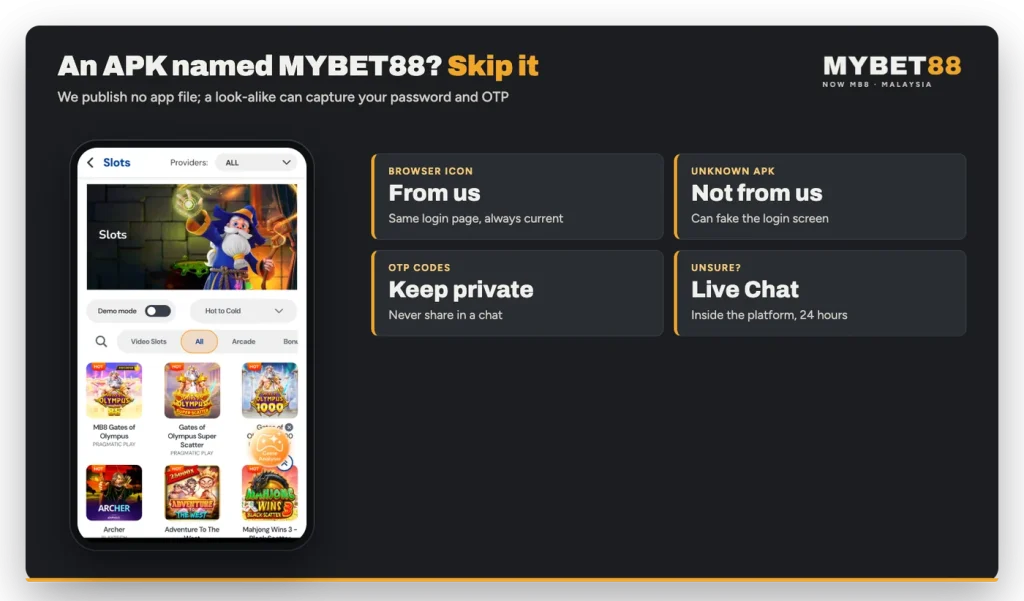
A file named after MYBET88 that asks you to allow installation from unknown sources did not come from us.
Searches for a MYBET88 APK download can lead to file-sharing pages, forum attachments or links forwarded in chat groups. The old brand name is exactly what makes those files convincing, because a returning player expects to see it. In general, a sideloaded package can show any login screen its author wants, and a look-alike form that collects a username, a password and the SMS code behind it is one of the oldest tricks in online payments.
| What to compare | Browser with a home-screen icon | APK from an unknown site |
|---|---|---|
| Who publishes it | Us, under the MB8 name | Someone you cannot identify |
| Login page | The real form, reached by you | A screen that can imitate ours |
| Updates | Always the current lobby | Fixed at whatever the file contains |
| Risk to password and OTP | Typed only into our own page | Can be read by the installed app |
| Account and cashier | Your usual account, wallets and history | Not something we can support or verify |
The comparison is not about convenience, because the home-screen icon already gives you that. It is about where your password and your one-time code are typed. Keep both inside the browser session you opened yourself and there is nothing for a copied login page to collect.
We also make no promises about a future app, a version number or a file size. If that changes, it will be visible on the platform itself rather than through a link someone sends you.
Everything the account needs is on the phone. New members can log in or sign up with a username, a password and a phone number using the +60 prefix, or create an account with Google or Telegram instead.
The cashier keeps its full set of tabs. FPX with Malaysian banks, E-Wallet with Touch ‘n Go and Boost, DuitNow QR and Bank Transfer all start from RM30, and crypto appears as its own tab, which can be shown under maintenance. Promotions are chosen in the Bonus dropdown on the deposit form, before you confirm the payment, not afterwards.
Withdrawals need one extra step the first time. Withdrawals open only once your phone number is verified by OTP, so press Request OTP in your profile, enter the SMS code and verify before you request a payout. Withdrawal bank, e-wallet and DuitNow details are saved under Withdrawal Details in the member area.
Browsing the games works the same way as on a desktop. Each lobby has a provider filter, a search box and a Sort By control, and the slots, fishing, crash, table and arcade lobbies carry a Demo mode toggle, which is a sensible way to see how a game behaves on a small screen before you transfer any credit to it.